Clinical Alert Triage Assistant: Rules First, AI for Context
2026-05-06
On this page
The problem I chose
Conversations with nurses and clinical staff during healthcare implementations made me interested in how alerts earn attention and trust. A priority label can tell someone that an alert matters without explaining what made it urgent. It can also miss context that changes how quickly someone should look at it.
Imagine a mildly raised heart rate. A simple threshold might assign it Low priority. Now add a patient who reports feeling lightheaded when standing, has a high fall-risk score, and recently received medications that can cause drowsiness. The measurement is the same, but there is more to review.
I built this personal prototype to explore that gap. Rules provide a predictable starting point. AI explains the result and can propose a small increase in urgency when supplied patient context supports it. The aim is to make that reasoning visible, while keeping firm limits around what the model can change.
This is a portfolio demonstration with simulated data, not a system validated for patient care. It covers six alert types: fast heart rate, low oxygen saturation, infusion pump alarms, nurse calls, fall risk, and sepsis screening.
Try the live demo · Explore the code
A small system with a clear boundary
I kept the interface, decision logic and model service separate. The browser submits a simulated alert to the backend, which runs the rules before sending the alert context and baseline decision to OpenAI. The model returns an explanation and an optional escalation proposal; the backend checks that response, applies the priority limits and chooses the destination team.
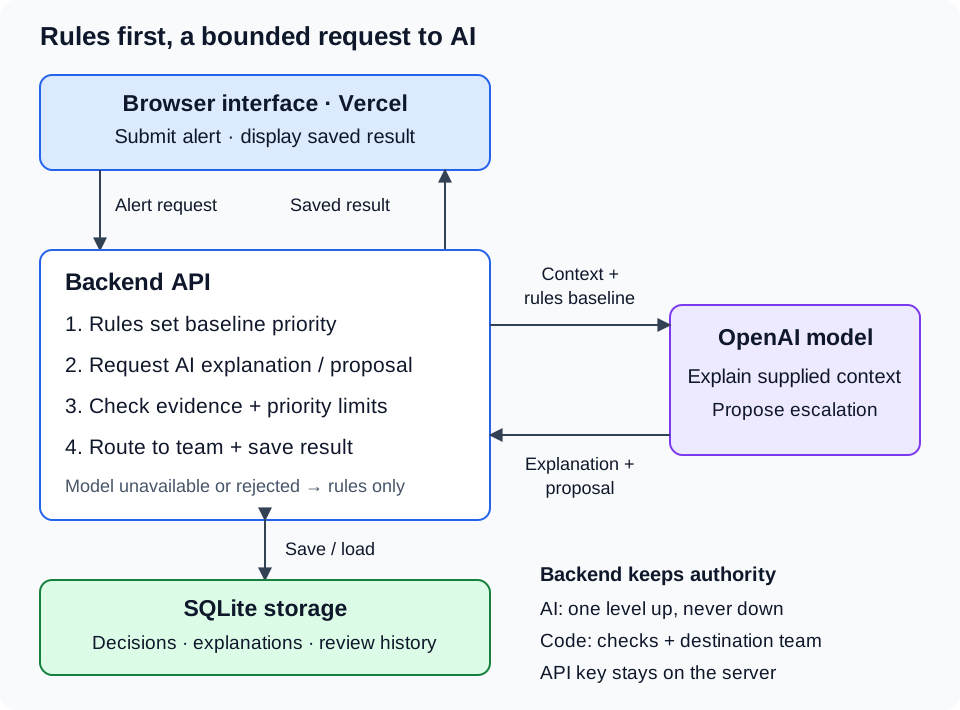
This puts the API key and decision checks on the server. The interface displays the saved result, while the model has no direct access to the queue or database. If the model call fails or its response is rejected, the backend can still return a rules-based result. SQLite keeps the prototype simple, with the tradeoff that dependable history needs persistent server storage and multiple backend instances would need shared storage.
How the pieces fit together
I split the workflow into a few responsibilities:
- Rules set the starting priority. Measurements, thresholds and repeat alerts produce a result that can be traced back to the input.
- AI reads the result alongside patient context. It writes an explanation and may propose raising priority by one level. It cannot lower the rules’ priority.
- Code checks the proposal and chooses the team. A model suggestion only takes effect after the checks pass. Routing remains controlled by code, even when AI raises priority.
- The app saves the result for review. The original rules result, AI contribution and any later human changes remain distinguishable.
The model therefore has a useful but bounded role. It can bring context into the decision without replacing the rules or choosing its own destination team.
A live example: a mild alert with extra context
This walkthrough illustrates the May-June 2026 project development timeframe. The screenshots show the Vercel-hosted demo; the original publication date remains May 6, 2026.
I selected Mild heart-rate alert, lightheaded patient and clicked Run example. This generated a fresh AI response, rather than reopening one of the saved examples.
The synthetic patient had a heart rate of 106 bpm. The matching rule covers heart rates above 100 and up to 110 bpm, so the starting priority was Low, routed to Bedside Nurse.
The input also included a fall-risk score of 60, recent oxycodone and diphenhydramine, and the message “Patient reports feeling lightheaded when standing.” Those details gave the model context beyond the heart-rate threshold.
The AI proposed Medium priority. Its recorded reason was:
The patient is on sedating medications (oxycodone, diphenhydramine), has a high fall-risk score, and reports feeling lightheaded when standing, which makes a delay riskier.
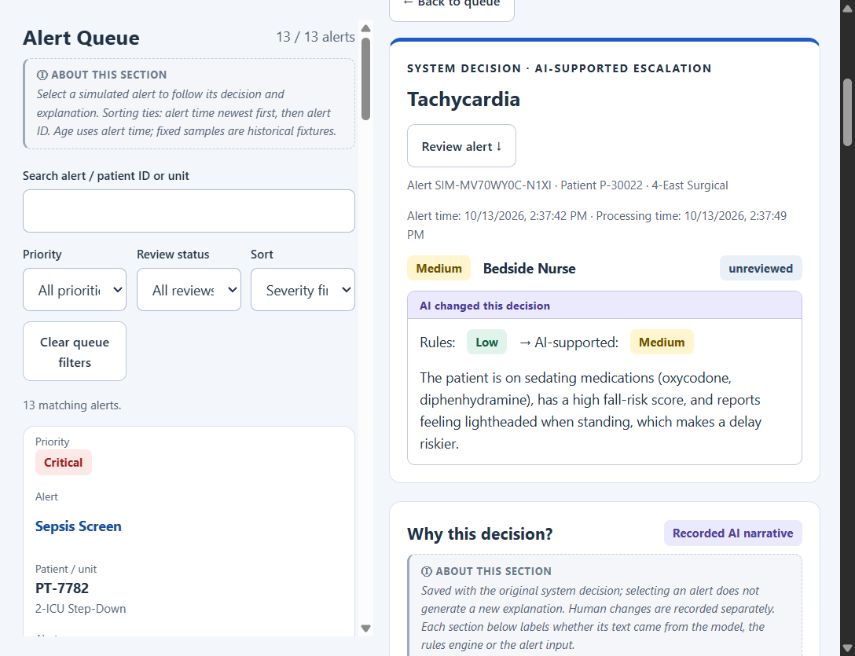
The live result shows the rules’ Low priority alongside the AI-supported Medium priority. The destination remains Bedside Nurse.
The app accepted the explanation and applied the one-level increase. The proposal cited the medication list, fall-risk score and message from the input. The router then selected Bedside Nurse for the resulting priority.
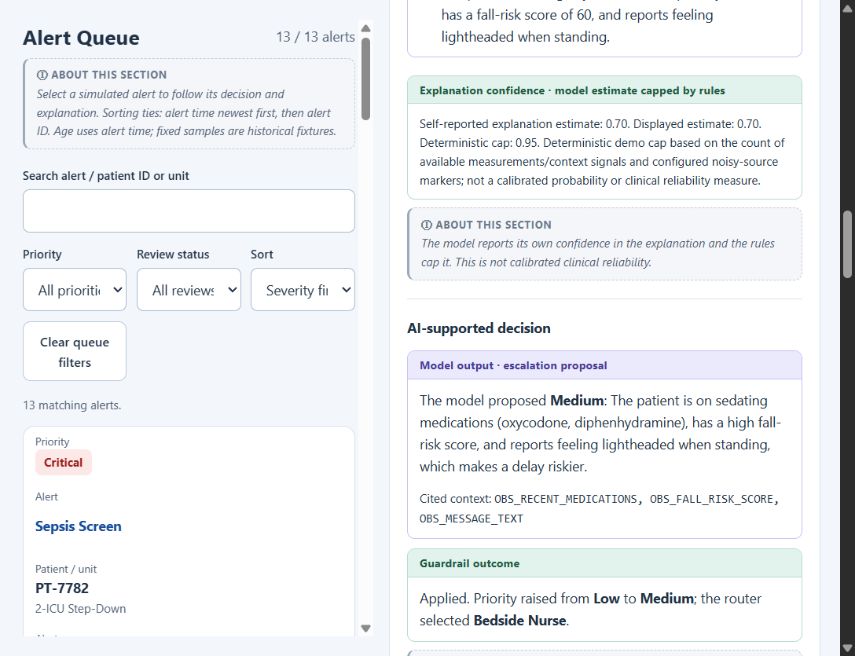
The screen separates what the model proposed from what the application allowed. Its confidence estimate is model-reported, not a clinical probability.
The saved record identifies the returned model as gpt-4o-mini-2024-07-18, with no fallback used. I kept the observed run details so the example can be inspected. Another generation may use different words or decline to escalate; this is one observed run, not a reliability study.
The guardrails that matter
Rules provide a floor. AI cannot reduce their priority, including a Critical result. Any accepted increase is limited to one level above the rules’ starting point.
A proposal needs evidence. The model must cite available context from the submitted alert. The app checks those references, recognized measurement claims, conflicting statements and configured prohibited phrases. An accepted explanation and a sufficient explanation-confidence estimate are also required before an increase can be applied.
Failure leaves a usable rules result. If the model is unavailable, times out, produces an invalid response or fails the checks, the app keeps the rules-based decision and supplies an explanation from the input and matched rules. It records why AI was not used.
Human changes stay visible. A reviewer can accept or override the result, with the original decision preserved. The prototype uses typed reviewer names rather than authenticated accounts, so it does not yet have a finished clinical permissions policy. Feedback is saved for inspection; it does not automatically train the model.
These checks limit the model’s authority, but they cannot prove every sentence is correct. A valid reference can accompany an unsupported claim, and phrase checks can miss a paraphrase. Confidence scores are also estimates, not measured clinical reliability. The demo’s thresholds and routing choices remain illustrative.
What this demonstrates—and what comes next
The live walkthrough demonstrates that the pieces work together: rules establish a baseline, AI uses supplied context to propose a bounded increase, code enforces the limits, and the interface explains the resulting decision.
Earlier offline evaluations used synthetic alerts and mocked model responses. They tested an earlier version in which AI could not change priority, so their priority-preservation results should not be read as evidence for the newer escalation feature. The current decision layer documents the bounded escalation used here.
I have not established clinician agreement, real-model accuracy across a representative dataset, or improved patient outcomes. Moving beyond a demo would require clinical review of the rules and escalation policy, stronger identity and access controls, dependable storage, and real integration testing.
What interests me most is the system-design balance: keep a clear rules foundation, let AI surface context within explicit limits, and show enough evidence for someone to question the result.